Thursday, 2 July 2015

Samsung Galaxy S6 coca-cola test! Can it survive?

Samsung Galaxy S6 coca-cola test
 Samsung Galaxy S6 is this year's top flagship device until now in the market. It comes with the best software and hardware features. It comes with 5.1 inches Super AMOLED screen with 1440 x 2560 pixels resolution with a surprising 577 ppi pixel density! It packs the Exynos 7420 chipset and Mali-T760MP8 GPU. Fingerprint sensor (PayPal certified), Samsung Pay (Visa, MasterCard certified) are the new feature that Samsung introduced. Corning Gorilla Glass 4 is used both on back and front panel. Samsung claims that they used Aircraft level material to build this device. But the most shocking thing is this phone is not IP67 certified though Samsung's previous flagship the S5 was IP67 certified.
So let's check how Samsung Galaxy S6 survive coca-cola! Check out if the Galaxy S6 can survive or not.....


Video Source: Youtube
Video Owner: Anrianisen

Wednesday, 1 July 2015

Samsung Galaxy S6 vs iPhone 6 head to head war on hot boiling water!

Galaxy S6 and iPhone 6 hot water test
Samsung Galaxy S6 and the iPhone 6 probably are this year's best flagship smartphones from two tech giants, Samsung and Apple inc. These two devices are packed with the best and top hardware... Best materials are used to build these phones. Apple inc. used uni-body metal to build iPhone 6 and tech giant Samsung has used Aircraft level materials to build their flagship, The Galaxy S6.... It's no doubt that iPhone 6 and Galaxy S6 are the two top smartphones right now. But, this year these two devices are not water resistance like previous year's flagships. Last year Samsung Galaxy S5 was  IP67 certified which means it can resist water for 15 minutes under 5m water. But these year Samsung has changed their mind and gone with the plan not to make the S6 IP67 certified though they used aircraft level material to build their S6. Apple inc. has followed their previous blueprint by not making the iPhone 6 water resistant this year also.
So we did a test to see how they perform and how long they last under water. And it's hot boiling water!!! So let's start this mad S6 and iPhone 6 boiling test! :D

 
Video owner: TechRax

Tuesday, 2 June 2015

Get $150 discount on Google Nexus 6!

Discount on Google Nexus 6

Google Nexus 6 is on sale on Google store with a $150 discount. Another good news is that Google has included free shipping.
It seems the best deal right now. You can buy Nexus 6 32 GB varient for only $499 with a $150 savings. If you choose the 64 GB varient then you have to spend only $50 more ($549). Google has made this deal more amazing with a free shipping offer!
Google hasn't announced anything indicating how long the sale would continue, so grab one early from Google Store.
■ Grab your Nexus 6 here.

New Launcher is coming preinstalled with Android M.

Google has announced the next Android version, "The Android M"
on Google I/O last week and also released a developer preview image of Android M.
The Android M is going to be a polishing version of Android Lollipop. But wait! Upon installing the developer preview of the Android M, you will see a difference in the app drawer. Google has gone with a vertical app drawer instead of it's regular horizontal app drawer. Now you have to scroll vertically to browse your apps.
Unlike the "Google Now" launcher, the "Google Now" feature have to be activated through settings on Android M. You will no longer find the Google Now at the left of your home screen.
The app drawer now arranges the apps in alphabetic order. However you can't jump according to the alphabets. You have to scroll downward to find your desired app. Google has also add a search bar and a recent app bar at the top of the launcher. On Android M latest alpps will show up according to your use which is quite handy.

So lets wait for the full version of Android M and see if Google change the  current launcher or not....
If you want to have a taste of Android M then you can have it by flashing your Nexus 5, Nexus 6 and Nexus 8.
If you want a tutorial on how to flash Nexus 5, 6 and 9 then do let us know via comments.....

image

Monday, 1 June 2015

Huawei Ascend Mate 2 users can have the taste of Android Lollipop 5.0

Great news for Huawei Ascend Mate 2 owners. When the Huawei Ascend mate 2 was first released, Huawei Announced that the Ascend Mate 2 will not get the Android Kitkat update. However at the last of 2014, Huawei announced that the Ascend Mate 2 will get the Android L update at the middle of 2015. So now Huawei is inviting Ascend Mate 2 owners to register on their site if they want to test the Android L on their Ascend Maye 2.
Here is the announcement from Huawei:
" Huawei will invite an initial group of Mate2 owners for this first stage of testing and then gradually expand the program as we get closer to the broader launch next month. We will continue to enhance the software, even after the initial version is made available, to deliver the best experience to you, our customers. We appreciate your patience as we continue to work on the Android L update for Mate2. "

Thursday, 28 May 2015

AT&T will start taking pre-order for LG G4 from 29th of this month.


AT&T has announced that the new LG G4 will be open to pre-order from May 29 and will come to local stores for sell on June 5. AT&T will start taking pre-orders for the LG G4 on May 29 from 12.01 a.m Eastern time.
Here is the announcement from AT&T:
"Customers can purchase the Metallic Gray version of the G4 for $0 down on AT&T Next at $21.00 at 30 payments on AT&T Next 24, $26.25 at 24 payments on Next 18, or $31.50 at 20 payments on Next 12. The smartphone will also be available for $199.99 with a two-year agreement, or $629.99 with no commitment. The Genuine Black leather version of the G4 will also be available on AT&T Next for $22.34 per month on Next 24, $27.92 per month on Next 18, or $33.50 per month with Next 12. The G4 will also be available for $239.99 with a two-year agreement, or $669.99 with no commitment."
Customers who will buy the LG G4 from AT&T's website will get the option to add LG G Pad F 8 for only $0.99 with a two year agreement. The LG G Pad F 8 will cost $149.99 without agreement.

Tuesday, 26 May 2015

Android M is here!

Android M edition!

So the Google I/O is just few days away from now! As usual we are hoping to hear an announcement on the new Android version, the Android M. According to Android Police, Google might revail Android M on Google I/O.
Hopefully Google will focus on Battery and RAM usage this time. Since Google new material design is still fresh, the update might only focus on the tuning.
According to rumors the new Android M will be available for developers first only and might be fully released on August....
This version of Android may also introduce native fingerprint support to compete with Apple iPhone's touch ID. The Google I/O will start with in a few days so let's wait and see what will actually happen .. ..

New teaser announced by OnePlus..It's "Time to change"......

OnePlus teaser.
OnePlus has recently posted a tweet on their twitter page..... They posted a teaser saying "Time to change".
We are hoping that they are going to announce something on June 1....
It might be or might not be about their next device OnePlus two, the chance is 50-50.....
"We're always looking for ways to shake up the tech industry. And we think it's time for change. Find out more June 1.
pic.twitter.com/odrsSko6dB
— OnePlus (@oneplus) May 26, 2015"
According the tweet they are again going to shake the tech industry.....
So let's see what is coming for us as June 1 is not far enough......

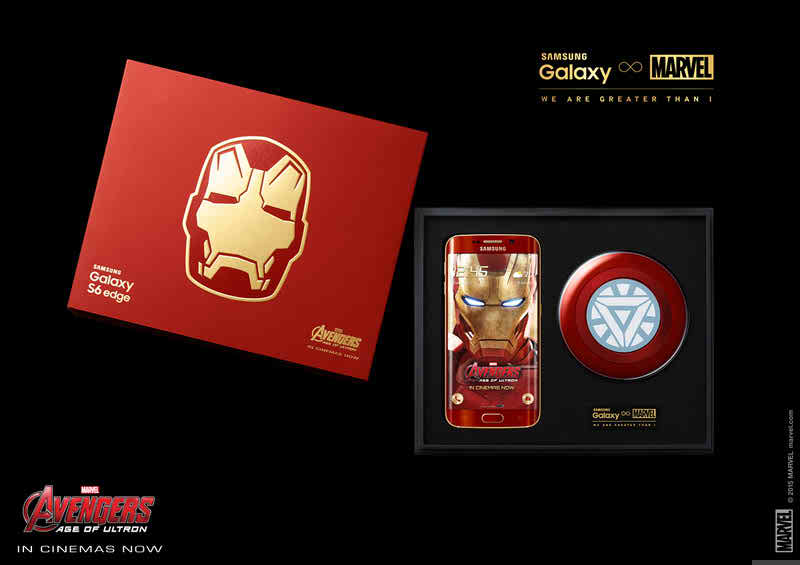
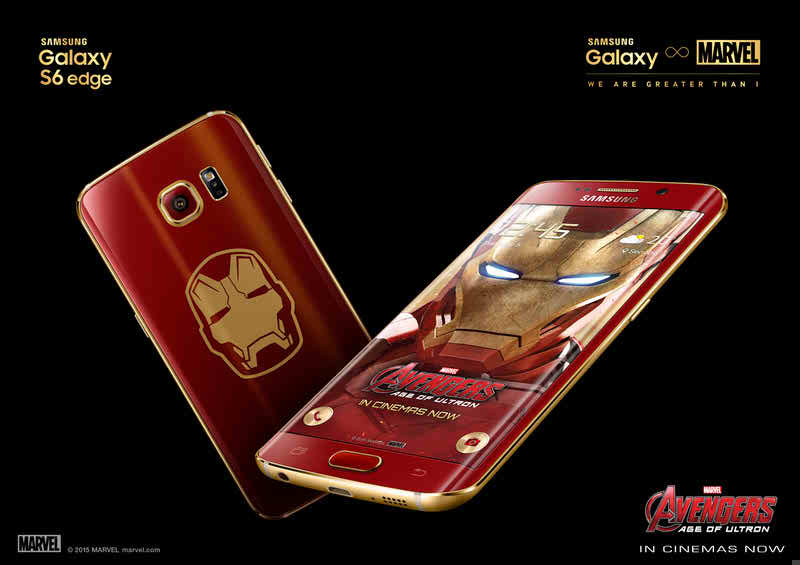
Samsung Galaxy S6 Edge Iron Man edition is on market for sale in SouthKorea from May 27.

Samsung Galaxy S6 Iron Man edition release date on market

After posting the teaser picture of the Samsung Galaxy S6 Edge Iron Man edition, the company has finally  releasing the Iron Man edition in South Korea for sale from May 27.
Samsung will release 1000 devices for sale tomorrow. The company mentioned that the limited edition phone will be available on China and Hong Kong next month. However the company hasn't mentioned when the device will be available on US.
Galaxy S6 Iron Man edition

The device comes with a box which is designed with Iron Man's faceplate. Iron Man's faceplate is also engraved on the back of the device. The device comes with red color with gold accents all around it. A wireless charger is also provided which is designed like an Arc Reactor seen at the body of Iron Man....

Sony Xperia M4 Aqua dual sim varient is launched in India for RS.24,990($390).

Sony Xperia M4 Aqua price in India.
Sony has launched the dual sim varient of Xperia M4 Aqua in India this week. At mobile world congress the device was unveiled.
Xperia M4 Aqua dual is IP68 certified which means it is dust and water resistent.
The device comes with a 5-inch Quad Hd display with a resolution of 1080×720p. It comes with a Octa-core Snapdragon 615 chipset clocked at 1.5Ghz which is 64 bit enabled. It has 2GB of RAM with 16 GB of internal storage. It offers microSD card expansion upto 64GB. A 5MP front shooter and a 13 MP rear camera are provided for nice camera experience. It supports Wi-Fi 802.11 a/b/g/n, Bluetooth 4.1 and NFC. 2400MAh battery is powering it. It comes with Android Lollipop out of the box. White, Black and Coral colors are available. The single sim varient might not be introduced in India.

Monday, 25 May 2015

The Iron Man edition of Samsung Galaxy S6 Edge will be available for sell next week.

Samsung Galaxy S6 Iron Man edition coming soon!

Samsung has posted a teaser photo of the Iron Man edition of the Samsung Galaxy S6 Edge at the begining of this month at their official Samsung Facebook fan page.

Now Samsung has announced at their fan page that the edition will be available for sell from next week. They will also be introducing the limited edition of Marvel-themed accessories for the device including different case for the Galaxy Note 4.

So just keep an eye on our website or on Samsung offucial Facebook fan page to grab one.

Xiaomi Mi 4i is on open sale in India for 2 days!

Xiaomi Mi 4i open for sale.
 Xiaomi is offering open sale for Xiaomi Mi 4i in India via Flipkart. Now you can buy a Mi 4i without any registration! But the offer will continue only for 2 days, May 25 and 26.
Since Xiaomi was launched in India, this is the first time the company is offering open sale.
The Mi 4i will cost around Rs. 12,999 ($205). The smartphone comes with a 5-inch full HD display, octa-core Snapdragon 615 SoC, 2GB RAM and 16GB storage. The phone also sports a  13MP rear camera with LED flash and a 5MP front camera, Wi-Fi 802.11 a/b/g/n/ac, Bluetooth 4.1, FM Radio and a large 3120mAh battery. The Mi 4i runs on MIUI 6.0 which is based on Android 5.0 Lollipop.
Flipkart is also offering a smart exchange offer on other Xiaomi handsets where customers can receive a rebate of up to Rs. 9,000 ($140).

Here is the list of the devices which are currently running on Android L (Lollipop).

Devices with android Lollipop update
Android Lollipop was released on October last year. The Google Nexus 6 was the first to get that update. However according to Google about 9% of android devices are running on Android L now. Android One devices were the second to get the Android L update and we haven't listed any android one devices.
Though the Android L was released last year still one a few devices are running on Android L. So here are the devices which are currently running on the latest Android L OS:

Motorola devices:
1.Moto X (2014)*
2.Moto G (2014)
3.Moto G (2013)*
4.Moto E (2015)
6.Nexus 6

Samsung devices:
1.Samsung Galaxy S6
2.Samsung Galaxy S6 Edge
3.Samsung Galaxy S5
4.Samsung Galaxy S5 Active
5.Samsung Galaxy S5 Duos
6.Samsung Galaxy S4
7.Samsung Galaxy S4 Active
8.Samsung Galaxy S4 Duos
9.Samsung Galaxy Alpha
10.Samsung Galaxy Note 4
11.Samsung Galazy Note Edge
12.Samsung Galaxy Note 3

HTC devices:
1.One M9
2.One M8
3.One M7

LG devices:
1.LG G4
2.LG G3
3.LG G2
4.LG G Flex 2
5.Nexus 5
6.Nexus 4

Sony devices:
1.Xperia Z3
2.Xperia Z3 Compact
3.Xperia Z3 Dual
4.Xperia Z2
5.Xperia Z1
6.Xperia Z1 Compact
7.Xperia Z Ultra

Asus:
Zenfone 2

Huwaei devices:
1.Huawei Ascand P7

OnePlus:
OnePlus one

Wednesday, 22 April 2015

Lg watch Urbane will be available soon on Google Store.


On a press release LG has officially announced that their new flagship watch which is mostly know as "Watch Urbane" will be available on Google Store for 13 countries by the end of this month.


According to the source the 13 countries may be:
  1. Australia
  2. Canada
  3. France
  4. Germany
  5. Hong Kong
  6. India
  7. Ireland
  8. Italy
  9. Japan
  10. Korea
  11. Spain
  12. The United Kingdom
  13. The United States
LG also said that the price will be announced when it is available for sell on Google Store. But we are hoping that it will get a tag price of $350 as its predecessor, the G Watch R was tagged at $300. But the steel and rose gold finishes might be differently priced.

When it come to hardware and the design, the LG Watch Urbane and the LG Watch R seems almost similar though LG has claimed that they have reduced the size of the circular bezel. If we keep aside the size of the circular bezel, case and stripe materials, everything else are the same. The hardware used are: Snapdragon 400 processor, 1.3" P-OLED display, 4GB of storage, 512MB of RAM, and a 410mAh battery which were used on its predecessor, the G Watch R also.

Though the hardware are same with the LG Watch R, the Watch urbane will come with 2 new features: LG Call & LG Pulse. The LG call will show you your favorite contacts and the most recent calls and you can directly call from your watch. Quite handy! Isn't it? LG Pulse will measure your heart rate/pulse every second. Hopefully the LG Watch Urbane will come with Android Lollipop 5.1 out of the box....

Here is the official trailer by LG:

Here is how to increase internal memory of any android device.

Are you facing low internal memory to install application on you android phone? Then this article is for you. Many of the budget android phones come with low internal memory to install applications. For that many of us who wants to install lots of applications or games face a lot of trouble due to low internal memory.

So if you are of that group then follow the instructions below to increase internal memory of your android smartphone.

Things you need:

  1. Rooted android phone. If your phone is still not rooted then follow the instructions mentioned here.
  2. 4GB SD card.
  3. Link2SD software. You can download the software directly from Google Playstore. Here is the link.
  4. A windows pc.
  5. Mini tool partition wizard. Download from here.
Procedure:
Minitool Partition wizard

  1. At first back up everything which are important.

  2. Next format your SD card.

  3. Plugin your phone using data cable and enable USB debugging. (To enable USB Debugging go to Setting>Developer options>Tick on USB Debugging)

  4. Now enable Mass storage mode on your android phone.
    You can do that either by swiping the notification bar and clicking USB Storage or by going to Connectivity>Usb connection mode>Mass storage mode(MSC).

  5. Now install Mini tool partition wizard in your desktop or laptop and open the software.

  6. Select your SD card in Mini tool partition wizard.

  7. You will find a Move/Resize option at the top bar of Mini tool partition wizard. Click on that and you will see something like the image below:

    Minitool Partition wizard[/caption]

  8. Now on "Unlocated space after" field use your desired size which you want to add in your internal memory (This memory will act as internal memory). We suggest to use 1024mb.

  9. After adding your desired size click on "OK" button.

  10. Now you will see a unallocated space right below your memory card partition. Right click on that and click "Create".
    Minitoo partition wizard

  11. A pop up message will show up. Ignore that message and hit "Yes".

    Mini Tool

  12. Now right click on that unallocated partition again and click format. A pop up message will show up. Select "Primary" in "Click As" section and "Fat 32" in "File System" section. Now hit OK and then Apply (Found on the top left corner of mini tool partition wizard.)

    file

    file (3)

    file (1)

    file (2)

  13. Now disconnect your phone from you PC.

  14. Go to Setting>Security and tick on Unknown sources.

  15. Install Link2SD and open the app. You will see a pop up message. Select "FAT32" from that pop up message and hit OK.
    Link2SD

  16. A superuser pop up message will appear. Give permission, just hit the "Allow" button.
  17. Now restart your device. And again open the Link2SD app. Go to menu>configure and then select "AutoLink". From now on whenever you install an app it will go to the second partition of the SD card and your internal memory will remain unused.

    Verify
If you face any problem when installing, just let us know by commenting below.

Wednesday, 25 March 2015

How to fix Google Play Store Connection Error, Connection Time Out on android.

How to fix Google Play Store Connection Error, Connection Time Out on android.
Android users are increasing day by day. Many of the android users are facing problems with their Google Play Store like connection Error, connection Time Out etc. It' is really an annoying problem for android users. So here is an article on how to fix Google Play Store Connection Error, Connection Time Out problems. For example you tapped on the Google Play Store and suddenly an error message shows saying, "Connection Error" or something like "Connection Time Out". Its really frustrating for everyone

Problem type:

  • Shows connection error when you try to open Google play store or download something.
  • Sometimes shows time out if you tap on download button.
  • Suddenly shows connection time out when downloading  an application from Play Store.
Reasons:

  • This type of problems generally occurs after rooting android devices.
  • Root permission based applications also causes this problems in many cases.
To fix these problems you have to do the following:

Method 1:

  • First download Root explorer from the following links:
    Download Links: Link 1 | Link 2 | Link 3
  • After downloading the app install it and open the app. Allow root permission for the app.
  • Now using root explorer find the root directory of you phone and find the folder labeled "etc".
  • Now find a file named "Host file".
  • Tap and hold on that file and select open in text editor.
    Note: Please back up the host file before making any change.
  • Now delete the line "127.0.0.1 localhost" from the host file and save it.
    Note: Don't touch any other line or make any change.
  • Now open Google Play Store and download with freedom. No error message will appear now.
Method 2 (For those who are using Freedom):

Android users who uses "Freedom" app might face the same issues. Method 1 might not be applicable for those. So if you are "Freedom" app user then try following the below instruction:

  • First connect your device to Internet.
  • Now open Freedom and close it after running for 1 minute.
  • Now tap on Google play store and download your desired app. No error message should be displayed.

Friday, 20 March 2015

Best android emulator for windows and mac!

Droid 4X Emulator.

Android is now absolutely the king when it comes to mobile games and apps. Many of the windows and MAC users want to play the great android games like Asphalt 8, Dead trigger, Modern combat on their windows pc, tablet or MAC. Unfortunately there were not even a good emulator since the Droid4X released. I know many of you still are not aware of this emulator and heard about it but believe me its the best emulator till now when it comes to gaming performance! It provides you some damn good features like:
  • Mapping keyboard: Mapping your keyboard for shortcuts. Now you can do what you want. You can map the keyboards as you like.

  • Zoom In-Out capability: You can zoom In and zoom out with the mouse which you will not find in any other emulator.

  • Root access: One of the best thing is you get root access! So you can play like a God, tweak like a God.

  • Google Play support: The best thing why i love this emulator is it supports Google play store. All most all of the emulators don't support many of the latest android apps let alone Google Play store. So this is really a great plus.

  • Performance and speed: When it comes to performance and speed you will not find a single emulator beating this one till now. It is packed with great performance and speed.

  • Android controller: Now you can make your android phone the controller of your game. You can enjoy all most all the game by using your phone as a controller like the video.
    Tips: Just try to play any racing game for only one time with the controller. I am pretty much sure that you will get addicted using the app. :-)
Comment below if you want to know more about Droid4x or want to know how to install this great emulator into your pc or tablet. If you have any question let us know.

Download Links:
For Windows Link 1 | Link 2For Mac: Link 1
E
mulator Download Link: Link 1Official Droid4x site: Link


Thursday, 19 March 2015

Android Launcher collection with download links.

Today we are going to share almost all of the android launchers. We all know that android is popular for its customization features which you will not find on any other OS like windows and iOs (yeah, you might get some customization options on symbian but they are not even comparable to android! :-p). You can find a large amount of launchers and icon packs on Google Play store. Some of them are paid and some of them are free. So we will try to give you the download links of almost all paid and free launchers!

So just go through all of the launcher's details and download whichever you want from this collection store!

1. Total Launcher:

Total Launcher 
So here is the Total Launcher. It is the newer version of ssLauncher which is quoted as the next generation of ssLauncher. It comes with all of the features available on qLauncher. The launcher is light, fast and unbelievably customizable!

Please note that if you have used ssLauncher before and have created backup of ssLauncher then don't use that backup because Total Launcher will not support that backup and might crash!

Details:

Name: Total Launcher
Version: 1.0.3
Last Updated: March 2015
File Type: APK
File Size: 1.9 Mb


Download Links: Google Play Store | Direct Links

Screenshot:
Total Launcher Screenshot

2. Z Launcher Beta:

Z Launcher.
Here comes the android Launcher from Nokia! Finally Nokia is doing something with android platform. Its fast simple and stylish. Nokia is working on this launcher to improve its performance and user experience. The more you use it the more it improves!

It provides some cool simple features like Scribble. Now you can just Scribble a letter to find what you want.

Details:

Name: Z Launcher Beta
Version: 1.1.1.7
Last Updated: March 16, 2015
File Type: APK
File Size: 8.1 Mb


Download Links: Google Play | Direct download

Screenshot:
Z Launcher Screenshot
3. Yahoo Aviate Launcher:
Yahoo Aviate Launcher
Yahoo Aviate Launcher. It's simple, smart and gorgeous. Things get organized automatically with this launcher. Its smart features will show you important notifications like traffic condition in your city, smart calender when you are in office. The launcher organizes all the applications for you and the most used apps are automatically pined in the center home screen so you don't have to waste time finding them. There are some other features like smart widgets, smart music etc.

Details:

Name: Yahoo Aviate Launcher
Version: 2.2.3.3
Last Updated: March 9, 2015
File Type: APK
File Size: 5.6 Mb


Download Links: Google Play | Direct download

Screen Shot:
Yahoo Aviate Launcher screenshot
4. Nova Launcher:
Nova Launcher

One of the most used customizable launcher is Nova Launcher. It is packed with hight customize ability with great performance. It will not slow down your phone and will not use much resource. You can download themes, icons, animation affects and more. It has almost all the features that you need link: Ok Google, colorful themes, icon packs, animation affects, scrollable dock, widgets, subgrid positioning and many more!

Details:

Name: Nova Launcher
Version: 2
Last Updated: December 1, 2014
File Type: APK
File Size: 4.5 Mb


Download Links: Google Play | Direct download

Screen Shot:
Nova Launcher Screenshot
 5. Solo Launcher:
Solo Launcher

Finally the Solo Launcher. One of the best light launcher which uses only one third of resource than the traditional launchers. Over 50 million android users are currently using this launcher. It is suitable for you if your android phone is slow or has less ram (less than 1 GB). It comes with integrated ram booster and memory cleaners which automatically clears ram space for you. It also supports gestures! which are really really handy.

Details:

Name: Solo Launcher
Version: 2.0.9.1
Last Updated: March 16, 2015
File Type: APK
File Size: 4.6 Mb


Download Links: Google Play | Direct download

Screen Shot:
Solo Launcher screenshot

Friday, 13 March 2015

Make your android look like an iPhone.

Make your android look like an iPhone.

So here is how you can make your android smartphone look like an iPhone. We all know that there are tons of handy tools which can help us doing that. If you search in Google Play you can find a lot of them but most of them are fake. But today i will share your two amazing paid apps (don't worry i will give you the apps for free!) which will surely make your android phone look and feel like an iPhone.
We will use Os 9 Launcher and iNoty for this.  So download the first.

Os Launcher 9:

The first app you need is Os 9 launcher. It's really an amazing and cool app to customize your android phone and make it look like an iPhone. It will cost you $7.98 if you download it from Google Play Store. You can either download the app from Google Play Store (paid) or from here (free).

Google Play Download Link: Google Play store Link.

Os launcher 9 features:

  • Screen animations are just like iOs.
  • Can call directly from the home screen.
  • Direct message sending option from the screen.
  • Translucent background.
  • App icons are like iOs 8
iNoty:

Another app you need is the iNoty. It's required for changing the notification bar. You can know more details about the app from Google Play store (Link). If you download this app from Google Play store it will cost you $1.48. You can also download it from our site for free.

Google Play Download Link: Google Play store link.

So if you are done downloading the apps then browse the files and install both apps. After finishing the installation process press the home button. A pop up will come up showing two options, one is Launcher and another one is Os 9 launcher (more options may occur if you have installed more than 1 launcher already). Select the Os 9 launcher and tap on always. You phone will start looking like an iPhone now!

If you wish to go back to your default launcher than go to settings> Applications > Downloaded. Then find out the Os 9 launcher. Tap on details and find out the "Clear default" option. Tap on that. After that press home button and a pop up will come up asking which launcher to use. Tap on the default launcher and select always.

Saturday, 28 February 2015

Here is how to enable, configure and use guest mode on LG devices.

Here is how to enable, configure and use LG's guest mode.

Guest Mode

We are here today to show you how to enable, configure and use guest mode found in most of the LG's Android based devices. However it is not LG's exclusive feature as android has introduced much before. So let's start. To start first you need to know what is Guest Mode in LG's smartphone.
What is Guest Mode on LG's android smartphones:
Guest mode is nothing but a different account/environment for a guest user. Just like the windows guest mode it's used for creating a different environment. However it will not create a separate account on LG's smartphone for guest. It will only create a separate environment with limited access or permission to applications. It means that the guest can only access to selected applications.
It's really a handy feature to keep your personal informations safe. But guest user can still access to data of the app to which you give them permission to access.
Supported devices:
You have to have a guest mode supported LG device to use guest mode as there is not specific app to enable guest mode. The guest mode was first introduced on LG G2 by LG. LG Realm also came with the feature. As LG Realm was able to handle guest mode, there is a huge chance that other LG devices will also come with guest mode.
Here is a list of supported devices:
  1. LG G2
  2. LG G3
  3. LG Flex
  4. LG Flex 2
  5. LG Realm
How to enable Guest Mode:
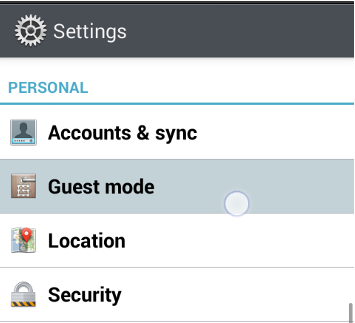
If you have a supported LG device and you want to enable guest mode then first go to "Settings". Then tap on the "Personal" menu. Find "Guest mode" and tap on that. You will see an On/Off toggle at the top right corner of the "Guest Mode". Then simply turn that on.
Here is the full path at a glance:
Go to Settings > Personal > Guest Mode > On/Off toggle (at the top right corner).
After truing it on a pop up window saying to configure screen pattern lock will come up. Simply configure a new pattern lock as the guest mode will not be activated without a pattern lock. To configure Pattern lock tap on Set pattern and set your desired pattern which will be used by the guest users.
How to configure Guest Mode:
So now you have to set the apps which will be accessible from guest mode. Note that, guest mode does not create a separate account. So, guest can access your applications data which are given permission for access.
To set the apps simply tap on the set apps button and find the edit apps at the top right corner. Now tap on that and choose the apps. Now tap on exit.
Full path at  a glance. 
First go to Set apps in the settings > Edit apps > Choose your apps > Ok > Exit.
How to use Guest Mode:
So now to enter the guest mode in LG's android Smartphone simply open the screen lock with the pattern which you setup for the guest mode. If you open the screen lock using that screen lock pattern (set up before for guest mode) then you will only see the selected apps which you gave permission. 
If you provide your usual pattern then you will be able to go back to your administrative mode....